Choosing a grid is one of the biggest decisions in a Perler Bead project. It affects detail, readability, bead count, project time, and how frustrating the build feels once you sit down at the board.
Many beginners think the largest grid is automatically the best option because it keeps more information from the source image. In reality, the best grid is the smallest size that still preserves the important shapes of the design.
What a grid size really changes
When you increase the grid, you are not only adding detail. You are also adding:
- more beads to place
- more color variation to manage
- more chances for noise to survive the conversion
- more time spent correcting weak areas
That tradeoff is worth it only when the design needs the extra structure.
For example, a simple icon often looks better at a moderate grid because the color blocks stay bold. A face or a character with distinct features may need more room, but only up to the point where the added detail still reads clearly in beads.
Think in terms of project intent
Before you choose a size, ask what kind of finished result you want.
Small display piece
Choose a smaller grid if the goal is a quick build, a keychain-size design, or a simple decorative motif. These projects work best when the subject is easy to recognize from shape alone.
Small grids are a good fit for:
- icons
- simple animals
- logos
- fruit, stars, hearts, and other bold shapes
Medium showcase piece
This is often the most balanced category. You have enough room for meaningful detail, but not so much that the project becomes bloated.
Medium grids are a strong choice for:
- simplified portraits
- cartoon characters
- sprites
- pets with a clear silhouette
Large detailed piece
Large grids make sense when the subject depends on more structure, especially across the face or clothing. But the image still needs to be visually strong. A weak source image does not become strong just because the grid is bigger.
Large grids work best for:
- wall pieces
- multi-board layouts
- detailed characters
- gifts where finish quality matters more than speed
Use nearby comparisons, not random jumps
One of the easiest mistakes is jumping from very small to very large and never testing the middle.
Instead of comparing extreme sizes, compare nearby sizes that show realistic tradeoffs. For example:
- one smaller version for speed
- one middle version for balance
- one slightly larger version for detail
That comparison shows whether the extra beads are buying you a meaningful improvement or just creating clutter.
If the larger version mostly adds small color shifts instead of clearer shapes, the middle size is usually the better choice.
Match the grid to the subject, not the source resolution
Your original photo may be high-resolution, but that does not mean the craft should be. Perler patterns need shape clarity more than image fidelity.
Ask yourself:
- Which parts of the image must survive the reduction?
- Which parts can disappear without hurting the design?
- Is the subject still readable when I step back from the screen?
If your design relies on texture that disappears at normal viewing distance, it is probably not the right image for that grid range.
A practical grid decision framework
Use this sequence when working inside the studio:
- Generate the first version at a moderate size.
- Check whether the subject is readable in the bead view.
- Lower the size if the result still looks busy.
- Increase the size only if essential features are missing.
- Compare bead count and color count before deciding.
This keeps the decision grounded in actual project value instead of guessing.
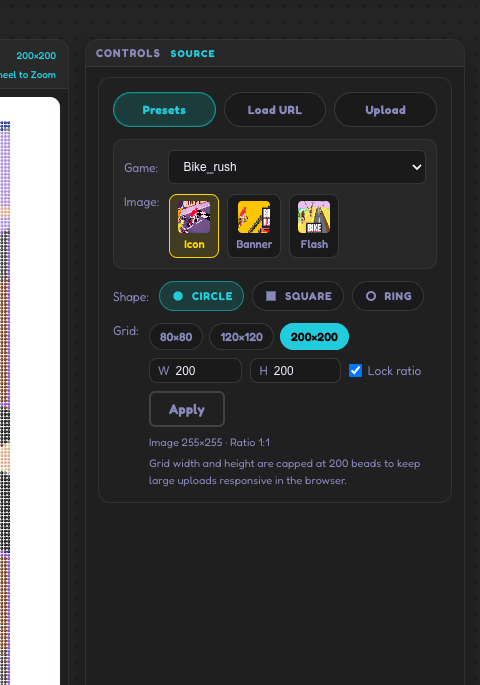
Watch the bead count with every size change
A grid increase can change the project faster than many beginners expect. A slightly larger board can mean a much longer build and a much larger material commitment.
That matters because a pattern can become less fun when:
- the color list gets too long
- the sections are harder to track
- the project takes longer than the finished result justifies
If the larger size adds effort but does not add stronger shape definition, it is usually not the right choice.
Common signs your grid is too small
Your current grid is probably too small if:
- the subject looks like a blob instead of a clear form
- important edges disappear
- facial features merge into one area
- the design only makes sense if someone already knows what it is
When that happens, move up slightly rather than dramatically. A modest increase often solves the real problem.
Common signs your grid is too large
Your grid is probably too large if:
- the image contains lots of isolated single-bead color noise
- you keep merging colors but the result still feels busy
- the background gets nearly as much detail as the subject
- the project feels expensive before it feels impressive
In that case, reduce the size first. It is often a faster fix than endless manual cleanup.
The best grid is the one you can finish well
A finished, clean medium-size build is more valuable than a giant unfinished pattern. Planning should support completion, not just ambition.
That is especially true for beginners. You learn more from finishing a well-sized project than from struggling through an oversized one full of corrections.
Pair grid selection with color cleanup
Grid size and color cleanup work together. A slightly smaller grid often removes noise on its own. A slightly larger grid sometimes creates new cleanup work that you did not need before.
That is why grid testing should happen before heavy color replacement. Once you settle the size, then move into color simplification with a clearer goal.
If you want help with that next step, read How to Reduce Colors in Perler Bead Patterns.
Final recommendation
Choose the smallest grid that still keeps the subject readable and satisfying. That is usually the version with the best balance of clarity, effort, and finished appearance.
If you keep that standard in mind, the grid choice becomes much easier. You stop asking, “How much detail can I keep?” and start asking, “What is the cleanest version I can build well?”
Community
Comments
Sign in with GitHub to join the discussion for this guide.